


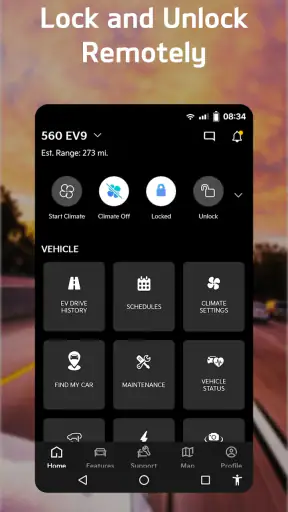
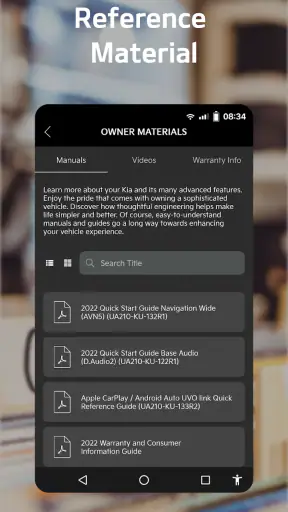
I found Kia Access most useful when I treated it as a practical companion for owning a Kia, rather than as a complete replacement for every vehicle-related task. It is a free productivity app from Kia America, designed to make vehicle information easier to reach from a phone. That sounds simple, but the value becomes clearer when I am away from the car, trying to remember a detail, preparing for a service visit, or checking whether the app is actually connected to the right vehicle account.
My overall impression is positive, especially for Kia owners who want one official place to begin when dealing with their vehicle information. The app has a 4.7 average from around 98 thousand ratings, and it has passed the one-million-install mark. Those figures do not guarantee a perfect experience, but they do suggest that Kia Access is familiar to a large number of owners and has earned a strong response. I would still approach it with realistic expectations: an owner app can organize access to information, but it cannot solve every problem caused by a phone, an account, a vehicle, or a dealership record.
Where Kia Access Usually Becomes Difficult
The first point of friction is often not the app itself. It is the relationship between the app, the owner’s account, and the vehicle information entered during setup. If one detail is typed differently from the information associated with the vehicle, the experience can feel confusing. A user may think the app is broken when the real issue is an account mismatch, an incomplete vehicle profile, or a connection that needs to be refreshed.
I recommend starting slowly instead of tapping through setup as quickly as possible. Use the same email address you normally associate with Kia ownership services, and pay attention to every vehicle detail requested by the app. If you recently bought a used Kia, moved from one vehicle to another, or have more than one Kia associated with your household, take extra care to identify the correct vehicle. A small mistake at this stage can make later screens look incomplete or unrelated to what you expected.
Another common stumbling block is assuming that every piece of vehicle information will appear instantly. Mobile apps depend on several parts working together: the phone, the user account, Kia’s systems, and the vehicle record. If one part is delayed, refreshing repeatedly may not help. In my experience, the better approach is to confirm the basics first, then close and reopen the app once, rather than repeatedly changing account details or reinstalling it without a plan.
The app’s purpose also needs to be understood correctly. Kia Access is most useful for organizing access to Kia-related information and ownership tasks. It is not the same thing as a general car-maintenance encyclopedia, a universal diagnostic scanner, or a substitute for a technician. If I need a mechanical diagnosis, I would not expect a phone app to identify the cause with the same authority as an inspection by a qualified professional.
That distinction matters because it prevents a disappointing first impression. When I use the app to find or manage information connected with my Kia, it feels focused. When I expect it to answer every question about warning lights, repairs, or vehicle behavior, the limits become more obvious. The best results come from using it as an official ownership tool and pairing it with the owner’s manual and professional service when the situation calls for either.
What to check before blaming the app
Before troubleshooting deeply, I would check whether the phone has a stable internet connection and whether the app is being used with the intended account. I would also make sure the selected vehicle is the one I actually want to manage. These checks sound basic, but they are especially important for families sharing vehicles or for people who have recently changed cars.
If the screen appears stale, I would leave the app, reopen it, and give the account time to load rather than making several changes at once. I would avoid guessing at vehicle details. Entering an approximate value just to get past a screen can create more confusion later, particularly when the app is expected to display information tied to a specific vehicle record.
A useful habit is to separate a login problem from a vehicle-information problem. If I cannot sign in, I focus on the account and connection. If I can sign in but the wrong vehicle appears, I focus on the vehicle profile. If the correct vehicle appears but a particular area does not behave as expected, I treat that as a separate issue instead of starting the entire setup again.
Setting It Up Without Creating Extra Work
The cleanest setup begins with a clear purpose. If I want Kia Access mainly for convenient access to vehicle information, I first make sure my account details are accurate and then confirm that the vehicle shown in the app matches the one in my driveway. This simple sequence reduces the chance of confusing an account issue with a vehicle issue.
I would also install the app before an urgent situation, not while standing beside the car with a warning light on or while preparing for a service appointment. A calm setup gives me time to notice whether the app recognizes the correct vehicle and whether the information I expect is available. Waiting until a stressful moment makes every delay feel worse and encourages rushed decisions.
For households with multiple drivers, I would decide who should maintain the primary account and who simply needs access to the relevant information. Even without making the app responsible for every family member’s workflow, this small bit of organization helps avoid duplicate profiles, forgotten passwords, and uncertainty about which vehicle is selected. The app is easier to use when ownership information is kept tidy.
There is also a practical privacy trade-off to consider. A vehicle app can be convenient because it gathers ownership-related information in one place, but that convenience makes account security important. I would use a strong, unique password and avoid signing in on a shared phone that other people can access freely. This is not a Kia Access feature claim; it is simply sensible behavior for any app connected with personal vehicle information.
Once setup is complete, I would spend a few minutes learning the navigation instead of relying only on the first screen. The goal is not to memorize every option. It is to know where the most useful information is located, how to return to the vehicle overview, and how to tell whether I am looking at current information or a screen that needs to refresh. That small investment pays off when I need the app away from home.
A realistic everyday use case
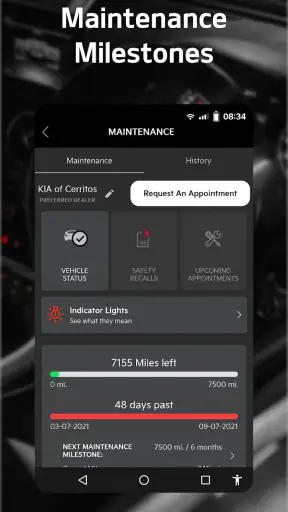
Imagine that I am arranging a service visit and want to have my vehicle details available before calling or arriving at the dealership. I can open Kia Access, confirm that the correct Kia is selected, review the information available there, and keep the app ready while discussing the car. This is more convenient than searching through old messages, photographs, or paperwork scattered across different places.
Another useful situation is lending the vehicle to a family member. Instead of explaining every ownership detail from memory, I can use the app as a reference point for information connected with the car. I still would not treat it as a substitute for explaining how the vehicle operates, but it can reduce the number of small details I need to hunt down manually.
The less obvious benefit is preparation. I get more from Kia Access when I open it during a quiet moment and understand what it can show me before I need it. Many owner apps feel disappointing when opened only during a problem. Used routinely, even briefly, the app becomes a more familiar starting point for vehicle-related tasks.
Recovering When a Workflow Stops
When something does not load correctly, I prefer a staged recovery process. First, I check the internet connection and confirm that I am signed in to the intended account. Next, I verify the selected vehicle. Then I close and reopen the app. Only after those steps would I consider signing out and back in, because repeatedly changing account states can make it harder to remember what actually fixed the problem.
If the issue affects only one area while the rest of the app works, I would avoid deleting the whole app immediately. A partial problem may be temporary or tied to one piece of account information. Reinstalling can create additional setup work without addressing the underlying cause. This is one of the most useful troubleshooting lessons I took from using owner-focused apps: preserve a working setup whenever possible.
When contacting support or a dealership, I would describe the problem precisely. “The app does not work” is difficult to act on. A better explanation is that I can sign in but see the wrong vehicle, or that the correct vehicle appears but a particular information screen does not update. I would note what I already checked and avoid changing several details just before asking for help. Clear symptoms make it easier for another person to identify whether the issue belongs to the account, the vehicle record, or the app session.
I would also keep the phone’s operating system and Kia Access current through the normal app-store process. Updates can resolve compatibility problems, but I would not assume that every update fixes every account or vehicle-record issue. If the app worked previously and stopped after a phone change, I would compare the account and vehicle selection on the new phone before concluding that the service itself is unavailable.
One advanced but simple workflow is to take a screenshot of an error message before dismissing it, provided the screen does not expose information I would rather not share. This gives me something concrete to refer to when troubleshooting. I would also record the time and the exact action that failed, such as signing in, selecting the vehicle, or opening a particular information area. That detail is far more useful than repeatedly saying the app feels unreliable.
Knowing when to stop repeating the same fix
There is a point where restarting, reinstalling, and trying again no longer adds useful information. If the same account or vehicle mismatch remains after careful checking, I would stop experimenting and seek help through the appropriate Kia support or dealership channel. Repeatedly creating new accounts is especially unhelpful because it can make ownership information harder to track.
I would also avoid treating a missing or unexpected vehicle detail as proof that the car itself is faulty. The app displays information through digital records; it does not replace a physical inspection. If the concern involves braking, steering, engine behavior, a warning indicator, or another safety-related symptom, I would deal with the vehicle directly and consult the owner’s manual or a qualified professional rather than waiting for the app to explain it.
This separation between digital convenience and physical safety is important. Kia Access can help me organize information, but I would never use a loading screen, an account display, or a normal-looking app page as evidence that a vehicle is safe to drive. The phone is a supporting tool, not a mechanical authority.
When the App Is Not the Cause
Some frustrations begin outside Kia Access. A weak connection can make an otherwise normal screen appear stuck. A phone with limited storage, aggressive battery management, or outdated system software can also affect how an app behaves. I would check those broader conditions before deciding that the application is at fault.
Account records are another important boundary. If the vehicle was recently purchased, transferred, leased, or added to a household account, the digital record may need attention from the organization responsible for maintaining it. In that situation, reinstalling the app will not necessarily correct the ownership relationship. The right next step may involve confirming the vehicle information with Kia or the dealership.
The same principle applies when a user expects information from a different Kia service or from the vehicle itself. Not every ownership question belongs in one mobile application. For technical specifications, I may prefer the owner’s manual. For maintenance advice, I may want a service professional. For a physical problem, I need the car inspected. Kia Access is strongest when I ask it to do the job it was created for: give me a convenient digital doorway into Kia-related vehicle information.
Compared with keeping paper documents in the glove compartment, the app is easier to search and carry because it stays on my phone. Compared with a general notes app, it is more appropriate for information tied to a Kia vehicle. Compared with third-party automotive apps, its main advantage is that it is the official Kia-focused option rather than a broad tool trying to cover every brand.
That comparison also shows where another option may be better. A general maintenance tracker can be more useful for logging oil changes, tire rotations, receipts, and reminders across several vehicle brands. A diagnostic tool can provide a different kind of technical information, although it requires appropriate knowledge and should not be treated casually. A dealership conversation remains better for ownership-record corrections or service decisions that depend on the vehicle’s actual condition.
Who will appreciate it most
I think Kia Access is a good fit for Kia owners who want a straightforward official reference point and prefer not to keep vehicle information spread across email, paper, and unrelated apps. It is also useful for people who regularly move between home, work, and service appointments and want their vehicle information available on the phone they already carry.
New Kia owners may benefit from setting it up early, while experienced owners may appreciate having a cleaner way to revisit information they normally search for only when needed. Families with more than one Kia can also find value in being deliberate about vehicle selection and account organization.
I would be more cautious recommending it to someone who expects a universal car-management platform, a full maintenance diary, or a professional diagnostic system. I would also not choose it as the only tool for managing a mixed household fleet. In that case, a broader automotive organizer may be more convenient, with Kia Access serving as the brand-specific companion.
The app is free, carries an Everyone age rating, and comes from Kia America. It has been available since July 26, 2018, which gives it the feel of an established ownership utility rather than a brand-new experiment. Those details make it easy to try, but the real question is whether my vehicle-information needs match its focused purpose.
My Practical Verdict After Using It
Kia Access is most valuable when convenience and official vehicle information matter more than all-in-one control. I like it as a first place to check Kia-related details, especially before a service conversation or when I need information away from the car. The interface is most helpful when my account and vehicle record are already correct, and the experience becomes much less frustrating when I understand that distinction.
My main advice is to set it up before an urgent need, confirm the correct vehicle, and troubleshoot in small steps. Do not create multiple accounts just because one screen looks wrong. Do not reinstall immediately when a refresh or account check may explain the problem. And do not use the app as a substitute for the owner’s manual, dealership support, or a qualified technician when the issue is mechanical or safety-related.
After weighing those limits, I would recommend giving Kia Access a try if I owned a Kia and wanted a free, brand-specific productivity app for vehicle information. I would skip it only if I needed a cross-brand maintenance manager or a technical diagnostic tool. For the right owner, its strength is not flashy entertainment; it is reducing the small amount of searching and paperwork that can make vehicle ownership unnecessarily inconvenient.
In short, Kia Access works best as a dependable starting point. It cannot remove every ownership complication, and it may require patience when accounts, vehicle records, phones, or connections do not line up. But once those foundations are in order, I find it practical, easy to justify keeping installed, and more useful in everyday ownership than its brief store summary suggests.


